This is going to be a problem for me. Can you imagine..? I couldn’t decided before. I loved the idea of flicking back and forwards and around, BEFORE. The background choices are now LITERALLY endless. I am hyperventilating. Literally. I am planning backgrounds now. Collages. Things I love. Like a blog desktop vision board… Woah. For now I have the current paper clip one as my work desktop. Because, you know how I am about stationary!
 |
| To demonstrate in case I have changed it again… Which I probably will. LOTS. |
Did you want to know how to do it? Here’s a quick tutorial. It involves the new DESIGN section so maybe export you blog before you give it a go, in case you are not happy with the result. Tell me in the comments if you want me to show you how to export your blog and reinstall it in times of design crisis! And you WordPress users can stop laughing now. I know, you’ve had all sorts of flexibilty for like, forever. But this is new and exciting for us Blogger bloggers.
Here we go…
- Sign into your blogger dashboard and go to the design tab
- Go to Template Designer on the second top menu
- Select background from the menu
- Select the little down tab next to the background imagine thumbnail
- Select Upload Image {Read the suggested sizes etc for optimial stuff} and you will find yourself here
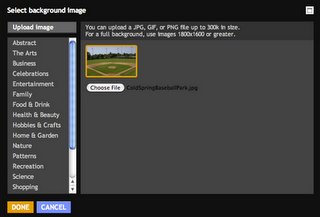
- Upload the image and click done and find yourself here
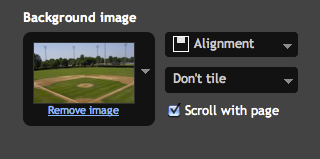
- Use the alignment and tile etc buttons to move it around and place the image
- The last decision that there is to make is to choose if the image is fixed or if it will scroll when you do. Test it out with the preview until you decide
- When you are happy with what you have click on Apply to Blog
- To return to the dashboard click on return to blog. Simple. Done. Over.
Thank you Blogger for the screen capture type pics. Totally saved me doing my own. I hope that helps. I actually hope you were as interested in this as I was. I know you probably aren’t as excited as me. I don’t think anybody could be.
Anyway. That is it.

 Suger
Suger 
Leave a comment